Slack
Chat with your agent directly from Slack — in a channel, a group DM, or a 1:1 DM with the bot.
Overview
Connecting a Slack conversation to an agent lets you:
- Talk to your agent from Slack instead of the DAM UI
- Let a whole channel work with one agent — and reach the same agent from several conversations
- Share screenshots, images, and files the agent can actually work with
- Get proactive posts — results after a scheduled run, alerts when a long task finishes
- Keep a persistent session per thread
Want it to read a channel, not answer in it?
Then you don't want a binding at all. The Slack connection
(Connections) signs your agent in as you, so it can read
and search any channel you can see — no /dam bind, and no invite for the DAM bot. One agent covers
as many channels as you point it at: the connection is granted per agent, not per channel, so
reach for several agents when you want separate knowledge or separate credentials, not when you want
more channels. Note there's no read-only mode — see the warning on that page.
Binding is the other thing entirely: a channel that talks to the agent. You can have either without the other, or both.
Is DAM in your Slack workspace?
To use DAM in a Slack workspace, the DAM Slack app must first be installed in that workspace. Not every workspace has it installed.
On your own deployment, you create and install the Slack app yourself; see Slack integration in the deployment docs. The steps below are for the IBM hosted deployment.
How to tell if DAM is installed:
- You can invite the DAM app to a channel.
- The
/damcommand is available in your workspace.
If neither is available, you'll need to request an installation.
How to request installation:
- Go to #dam-community.
- Open the Workflows tab at the top of the channel and select the Slack request workflow.
- Submit the request. The DAM team will follow up with a one-time installation link to add DAM to your workspace.
Once installed, you'll be able to invite DAM to channels and use the /dam command in that workspace.
Note
Installing the DAM app in a workspace is separate from setting up a Slack connection. A Slack connection authenticates an agent as your own Slack account, allowing it to read and post messages wherever you have access. See Connections.
Who can drive the agent
The binding is the authorization. Anyone Slack admits to the conversation can drive the agent, and every turn runs under the agent's own credentials and connections — never the sender's. There is no per-person mode, no login needed to talk to the agent, and no allow-list.
What a binding delegates
Connecting a conversation lends the agent to everyone in it. A colleague who pushes to GitHub through the agent does so with the agent's token, attributed to the agent — not to themselves. Bind only where you're comfortable with that, and manage access the way you'd manage any Slack membership: channel membership is the gate.
The binding owner's Terms of Use acceptance gates every turn — the terms bind the party whose credentials run the work, not whoever typed.
Turns are attributed in the security log by Slack user id. In channels and group DMs the agent sees each message labelled with the sender's Slack mention, so a busy multi-speaker channel stays readable and attributable — a 1:1 DM isn't labelled, since there's only one human in the room.
Channels bound for named people only are gone
Earlier versions let you bind a channel for named people only. That mode was removed, and those
bindings were deleted on upgrade rather than widened to the whole channel — that's a decision
only you can make. If a channel went quiet after the upgrade, run /dam bind again to reconnect
it.
Connect a channel (/dam bind)
A conversation does nothing until it's bound to an agent. The quickest path is from inside Slack:
- Invite the DAM bot to the channel.
- Send
/dam bind. - Follow the link to authenticate, then pick one of your own agents from the picker.
- You're done —
@mentionthe agent and it answers in a thread.
Binding lends the agent to the whole conversation
Everyone Slack admits to the conversation drives the agent under its own credentials. Slack tells you as much before you confirm.
The same command binds a group DM or a 1:1 DM with the bot; see how the agent is triggered for what each surface needs. A group DM has to include the bot from the start — Slack doesn't let an app join one later — so binding a group DM the bot isn't in is refused. Start a new group DM that includes the DAM app, or move the conversation to a private channel and invite the bot there.
| Command | What it does |
|---|---|
/dam bind |
Connect one of your agents to this conversation |
/dam unbind [agent] |
Release a binding — allowed for whoever bound it, or the agent's owner |
/dam default [agent] |
Make an agent the one that unnamed mentions reach — the agent's owner only |
/dam ambient [agent] on\|off |
Turn ambient mode on or off for one agent |
/dam ambient [agent] |
Report whether ambient mode is currently on |
/dam whisper [agent] "message" |
Ask an agent something privately — only you see its answer |
/dam whisper [agent] |
Open a private conversation with an agent in your DM with the bot |
/dam whisper [agent] on\|off |
Turn whispers to one of your agents on or off — the agent's owner only |
/dam ignore [message link] |
Stop the agents here from answering one app's or webhook's posts; on its own, list the apps ignored |
/dam unignore <app> |
Let an ignored app's posts reach the agents here again |
/dam delete <message link> [reason] |
Remove one of your agent's posts — the agent's owner only |
The agent name is needed only where more than one is connected in the conversation. A bare /dam
prints the usage help.
When /dam login is required
Talking to the agent never needs a linked account, and neither does a whisper. Linking authorizes
the management commands — /dam unbind, /dam ambient on|off, /dam default <agent>,
/dam whisper <agent> on|off, /dam ignore, /dam unignore, and /dam delete — and, for an agent's owner, it's also what lets the agent
post beyond its own conversations. /dam bind links you automatically,
so if that's how you connected the conversation you're already set; if you bound from the CLI,
you were never linked, and those commands will ask you to run /dam login first. Reading the
current state with a bare /dam ambient, /dam default or /dam ignore never needs a link.
/dam logout unlinks.
Bindings are many-to-many
One agent can be connected to several conversations at once — channels, group DMs, and DMs in
any mix — so the same workspace, memory, and skills are reachable from all of them without
duplicating the agent. And a conversation can hold several agents: running /dam bind where
one is already connected adds to it rather than replacing it, and Slack tells you who's already
there before you confirm. See Several agents in one conversation.
A bind is never refused because the conversation already has an agent — only because it already has that same agent.
Conversations never bleed into each other: threads and sessions belong to the conversation they
happened in, so a reply can't surface in another one. /dam unbind releases only the
conversation you run it in, leaving the agent's other bindings alone.
A binding is fixed to its conversation — nothing moves one. To reach the same agent from somewhere else, bind that conversation too (and unbind this one if you no longer want it).
How the agent is triggered
| Surface | What triggers a reply |
|---|---|
| Channel | An @mention of the bot |
| Group DM | An @mention of the bot |
| 1:1 DM | Every message — a DM is already addressed to the bot, so no mention is needed |
Posts by other apps, webhooks and other agents reach an agent the same way a person's do — a mention,
or anything in an ambient channel. An agent never answers its own posts, and a run of app and agent
posts with nobody in between stops starting turns until a person posts again. To stop the agents in a
conversation answering one app at all, run /dam ignore with a link to one of its posts.
Inside a thread the agent is part of, a reply that doesn't tag it won't reach it while ambient is off. The first time you do that in a thread, you get a private note saying so.
Editing an earlier message doesn't re-trigger a reply. Replies land in a thread, unless the agent chooses Slack's also send to channel, which surfaces the post in both places.
Mentioning or DMing an unbound conversation gets you a private, sender-only note — in a DM or
group DM it points you at /dam bind; in a channel it just says no agent is connected. A plain,
un-addressed channel message gets no notice at all.
Several agents in one conversation
A conversation with one agent behaves exactly as described above — everything in this section only
starts to matter once you /dam bind a second one.
Reaching a specific agent. Start your message with its name, right after the bot mention:
Matching is case-insensitive and ignores extra spacing, and the name has to come first. Anything else
— a bare @dam with no name, a name that isn't connected here, or a name two connected agents both
answer to — goes to the conversation's default agent instead, which is quietly the common case: it
means a channel keeps working even when nobody remembers the roster. An agent handed an ambiguous name
is told as much and will say so rather than guess.
The default agent is whichever was connected first. Change it with /dam default <agent> —
allowed for that agent's owner only, since the default absorbs every unnamed mention. A conversation
can also end up with no default: disconnecting the default doesn't promote a replacement, and until
someone runs /dam default, an unnamed mention reaches nobody and says so.
Slash commands are stricter than mentions
/dam unbind, /dam ambient, and /dam default need the name to match a connected agent
exactly, and refuse rather than falling back to the default — so a management command never acts
on an agent you didn't mean.
Reading along. Ambient mode is per agent, so you can have one agent following the channel while others stay mentions-only. Where several are ambient, they take a message one at a time rather than all at once, and each later one can see what the earlier ones already posted — so they don't pile three answers onto the same question. The order isn't fixed, beyond the default going first.
Handing a message over. An agent that judges a teammate better placed to answer can pass the message to it, and that agent replies in the thread itself. A handed-over message can't be handed on again, and attachments don't travel with it — the receiving agent gets the text.
Whispering to an agent
Anyone in a connected conversation can reach one of its agents privately with /dam whisper — no
linked account needed.
/dam whisper "message"sends one message. The answer appears right there, visible only to you./dam whisperon its own opens a thread in your DM with the bot. Reply in that thread to keep talking to the agent; nobody in the original conversation sees it.
With no name, the whisper goes to the conversation's default agent;
put the agent's name first to pick another (/dam whisper Ops "is staging up?"). The message has to be
in quotes — unquoted text is read as an agent name, so a message you forgot to quote is refused rather
than sent.
An agent's owner can turn whispers off with /dam whisper <agent> off — for every conversation the
agent is in — and back on with on. While they're off a whisper is refused, and a whisper thread
that's already open ends at its next message.
Private from the conversation, not from the agent's owner
A whisper is kept out of the channel, but it's still a conversation with the agent — and, as the bot tells you when it opens one, "Like every conversation with an agent, its owner can read it."
Deleting an agent's post
An agent's posts carry no delete button. To remove one, its owner runs /dam delete with the post's
link (Slack's Copy link on the message), optionally followed by a reason:
You confirm in a dialog, where the reason is already filled in and can be edited. The post is removed for everyone; the agent's session keeps what it wrote. Where the post was a reply in a thread, the agent is told in that session, along with your reason if you gave one — the confirmation says when it will be.
Only the agent's owner can delete its posts, and DAM has to be able to tell you're the owner, so the command needs your account linked. Anyone else is refused.
Ambient mode
Normally the agent only answers when tagged. In ambient mode it reads along with the whole channel and decides for itself when to speak up — answering a question it can answer, picking up a task someone described, flagging a clear mistake — and stays quiet otherwise. Mentions still work exactly as before; ambient only adds a second, quieter path in.
Ambient is off by default on every connect path, and turning it on is a deliberate choice: an ambient agent reads every message in the channel, not just the ones aimed at it.
/dam ambient on      # the agent starts reading along
/dam ambient off     # back to mentions-only
/dam ambient         # report the current state
Where several agents are connected, name the one you mean — /dam ambient Ops on. Ambient is set per
agent, so turning it on for one leaves the others mentions-only.
Changing it is allowed for whoever bound the channel, or the agent's owner — the same permission
as /dam unbind, and like unbind it needs your account
linked. It can be flipped any time, with no reconnect needed.
What to expect when it's on:
- Dropping the
@still reaches it. People rarely tag a bot mid-conversation, so an ambient agent treats a message that simply calls it by name — DAM, dam, or the agent's own name — as addressed to it, and answers as it would a mention. That only applies while ambient is on: in a mentions-only channel a typed name is never delivered at all, so nothing is quietly missed. - It may react instead of replying when an emoji says enough by itself — agreement, "done", "this is a bug". A reaction notifies nobody, and it isn't a pickup signal: the agent is asked not to react just to show it saw a message, so a missing reaction doesn't mean it passed on one.
- It replies in a thread under the message it's answering. The follow-up conversation runs as an ordinary thread from there.
- It follows the channel, rather than starting cold on each message, so it can pick up on something described across several messages.
- The change isn't announced in the channel. Whoever flips it sees the confirmation privately; other members get no status post either way.
- Nothing is ever posted about attachment problems. Ambient turns stay out of the channel's way: an attachment that couldn't be used is reported to the agent but never to the channel.
Tell the channel
Since ambient isn't announced, let the channel know when you enable it — people generally want to know an agent is reading along.
Sharing images and files
Paste or drop an attachment into a message and the agent gets it — a screenshot of a failing UI, a diagram, a CSV to analyse, a PDF to summarise. It works on mentions, DMs, and ambient turns alike. Images and other files travel by different routes, so they have separate rules.
Images are read directly, in the message itself:
- PNG, JPEG, GIF, and WebP. Another picture format — an HEIC photo straight off a phone, an SVG, a BMP — is withheld, and the agent is told an attachment was withheld rather than left to guess at its contents.
- Up to 30 MB of images per message. Go over and the images are left out — your text still goes through, and the agent is told what it didn't get.
Everything else is saved into the agent's workspace and handed over as a file path, so the agent can open it with ordinary tools rather than having to read it as a picture:
- Up to 20 MB per file, and 20 MB per message. Over either and the file is left out with a reason; send them a few at a time.
- The agent is given each file's name and where it landed. A document too dull to read as an image — a log, a spreadsheet export, a PDF — is now something it can actually work with.
For either kind, a file that can't be fetched is named and left out, and the agent gets your text plus whatever did load. Nothing is guessed at: an attachment that didn't make it is reported to the agent as withheld, along with why.
Withheld notes are private, and ambient turns get none
On a mention or DM you get a private, sender-only note naming anything that was left out. On an ambient turn nothing is posted in the channel either way — the agent is still told what was withheld, but the channel stays quiet.
How sessions work
- One thread = one session. Each Slack thread maps to its own persistent DAM session.
- Sessions resume. Come back to a thread days later and the agent normally picks up where it left off. If the session can't be restored, the thread starts fresh with recent messages injected as context — so the conversation continues, but the earlier reasoning is gone.
- Threads run in parallel. Several conversations with the same agent at once is fine. Within one thread, messages are handled in order rather than concurrently.
- A burst of messages gets one answer. Write a thought across three messages — in a DM, or in a thread — and the agent waits for you to finish, then answers all of them together, rather than replying to the first fragment before you've made your point. Something you add while it's already working is handed to the in-flight turn where the harness supports that, so you still get one reply; otherwise it becomes the next turn rather than a second answer racing the first. A message with an attachment always gets its own turn, and holds back anything behind it so nothing arrives out of order.
- Bursts are grouped per conversation. In a channel or group DM, each top-level mention starts a conversation of its own, with its own session and its own reply thread — so two separate requests are answered separately, and neither waits on the other. Inside a thread, a reply that mentions the agent joins the conversation already running there, whoever sends it, so a correction reaches the agent while it can still act on it. Only in a 1:1 DM, where no mention is needed, do separate top-level messages run together into one burst.
- Fresh sessions get context, labelled for what it is. A conversation started at the top level of a channel is given the channel's recent messages — up to about fifty — as background rather than as something to answer; in a DM, that's your earlier exchange with the agent. Picking up inside an existing thread injects up to fifty of that thread's most recent replies, plus the message that started it, as the conversation being answered. The window is deliberately short.
- The agent can read a thread it wasn't in. A channel's recent messages don't include the replies inside its threads, so a message that started a thread is marked as having replies, and the agent can go and read that thread — paging back through a long one; an extremely long thread may be only partly readable, and the agent is told when it is. It can read only threads it was shown this way, in a conversation still connected to it, and only for a while afterwards. Reading a thread doesn't change where the agent can post.
- A conversation the agent returns to catches up. Picking a thread back up — or, in ambient mode, the channel it reads along with — it's also given whatever arrived since its own last turn there, so a conversation that carried on without it, or that another connected agent answered in the meantime, isn't invisible to it. Messages already part of the turn it's on aren't presented as missed, and if a turn fails, the messages it held come back in the next one. Best-effort: after a platform restart, the catch-up starts from the agent's own last post there instead, or from a recent window where there isn't one.
- Ambient adds a channel-level session for top-level messages, alongside the per-thread ones.
What else to expect
- A working status while it thinks. On a mention or DM you'll usually see the agent's live status — thinking, the tool it's currently running, or waking. It rides Slack's assistant-status surface and shows nothing where the workspace can't display it. Ambient turns show no status, since nobody summoned it. Where Slack offers a Stop button on that status, pressing it ends the turn — allowed for whoever asked or the agent's owner; anyone else is told they can't.
- The first message wakes a sleeping agent. If it's hibernated, expect a delay of up to a minute or two. The initial heads-up is private to whoever sent the message. Where the agent is slower than that, the turn keeps waiting rather than giving up, and the thread says so — the agent is still starting; it'll answer as soon as it's up — for everyone to see. It does give up eventually. A stopped agent is different, and so is one whose image won't pull or whose owner is over budget: those aren't slowness, they're answers, and the thread says so straight away rather than waiting.
- Long work isn't dropped. A turn is judged by whether the agent is still going, not by how long it has taken, so a job that runs for an hour finishes and answers.
- An answer the relay loses is still posted. Where the agent wrote a reply that never made it to Slack, it's asked once to post it, and what you see is the answer rather than an apology. If something already went wrong visibly in the thread, the agent knows you saw that and answers accordingly. An agent that deliberately had nothing to say isn't prodded.
- Every post is signed. Each message the agent posts opens with its emoji and its name in bold,
and under it Slack shows
- Powered by DAM as a link. One bot posts for every agent, so the name is how you tell them apart. Anyone can follow the link — it lands on the agent's public page, described below, not in the conversation; from there someone with a DAM account can Open in DAM to reach the thread's session itself. - Agents can post first. A bound agent can post on its own — results when a scheduled run finishes, or an alert.
- A blocked network request won't stall the turn. Nobody in the channel can answer an approval, so with no chat, terminal, or SSH session of your own open on the agent, the request is refused straight away — and instead of going quiet, the agent tells you which host it needed. It's still recorded in Activity; allowing it there writes the rule the agent picks up on its next attempt. With a session of your own open, the request holds and resolves as usual.
- Nobody is there to answer a permission prompt, either. If the agent's harness is set to ask before running a tool, that question is refused on a Slack turn rather than left waiting, so the tool doesn't run. What an agent can do in a channel is what its permission setting already lets it do unasked. The platform's own tools — the ones it replies with — are let through where the harness allows it; Bob's Ask every time setting warns that a Bob agent can't reply in a channel, so give a channel-bound agent a setting that doesn't ask before the tools it needs. This is separate from network approvals, above.
How the agent posts
Proactive posts work through two built-in tools the agent calls itself: describe_channel
(list the chats it can post to) and send_channel_message (post text, optionally with a
single file attached — a large file is refused). Nothing to configure, but there are limits on
where it can reach beyond its own bound conversations:
- It can post only where the DAM bot is already a member, so a channel the bot hasn't been invited to is refused.
- It can reach only channels its owner is a member of, public or private, and only those are
in its list of chats. That's checked through your linked Slack account: until you've run
/dam login(or bound a conversation with/dam bind), it can't reach any channel beyond its bound ones. Group DMs aren't affected by this. - A DM has its own limit: the agent can message only its owner, the person in a 1:1 DM it's connected to, or a member of a channel it's connected to. Anyone else is refused.
- An agent bound in more than one Slack workspace can post only into conversations it's bound to, or the one it's answering right now — a new channel or a DM with someone is refused, since a channel or person only means something inside one workspace.
A reply from a Slack user to one of these posts is routed by that conversation's own binding.
An agent can also open a DM with someone, but that DM isn't bound by the post — for their
replies to reach the agent, the DM needs its own /dam bind.
Answering you in a thread is a third tool, and it can attach a file too — so a reply can hand back the report or chart it just made rather than describing it. The file goes up after the reply has already posted, so if the upload fails the answer is still in the thread and the agent is told the attachment didn't make it.
The agent's public page
For most people in a shared channel, that signature link is the first bit of DAM they ever open — and they may not have an account. So it goes to a page that needs no login, naming the agent, showing who created it, and explaining that this agent is worked with by mentioning the bot in Slack. Underneath, it invites the reader to create their own agent; if they already have an account, Open in DAM takes them into the conversation instead.
The page names an agent only while that agent is connected to at least one channel — which every agent posting in Slack is. Anything else shows the same generic introduction to the platform: an agent nobody has connected to a channel, an address that was never an agent, one that has since been deleted. That is deliberate, and it means the page is not a way to find out whether an agent exists or to check who may open it — those two states aren't a permission check, and the page can't tell an owner from a stranger.
Disconnecting a channel un-names past links
Because naming follows the agent's current channels, releasing the last one turns every signature link the agent ever posted — going back through the channel's history — into the generic page. The links keep working; they just stop naming the agent.
Other ways to bind
You can also connect a channel as you create the agent — the Channels section of Create an agent offers Slack Channel and Telegram Chat, so an agent can be reachable from Slack before you've ever opened its chat. See Create.
Otherwise, connect a channel from the DAM UI or the CLI at any time. DMs and group DMs bind in-chat
with /dam bind.
Once connected, a channel is shown by name — #team-eng rather than a raw C0… id — on the agent's
row and wherever its channels are listed. You still connect it by id; the name is just how it's
displayed afterwards, and the id shows instead where the name isn't known. A connected DM reads as
DM with the person, and a group DM as Group DM with its members. A channel that has since been
deleted, or a private one the bot was removed from, says on the Slack card that it's no longer available
in Slack, with a hint to disconnect it.
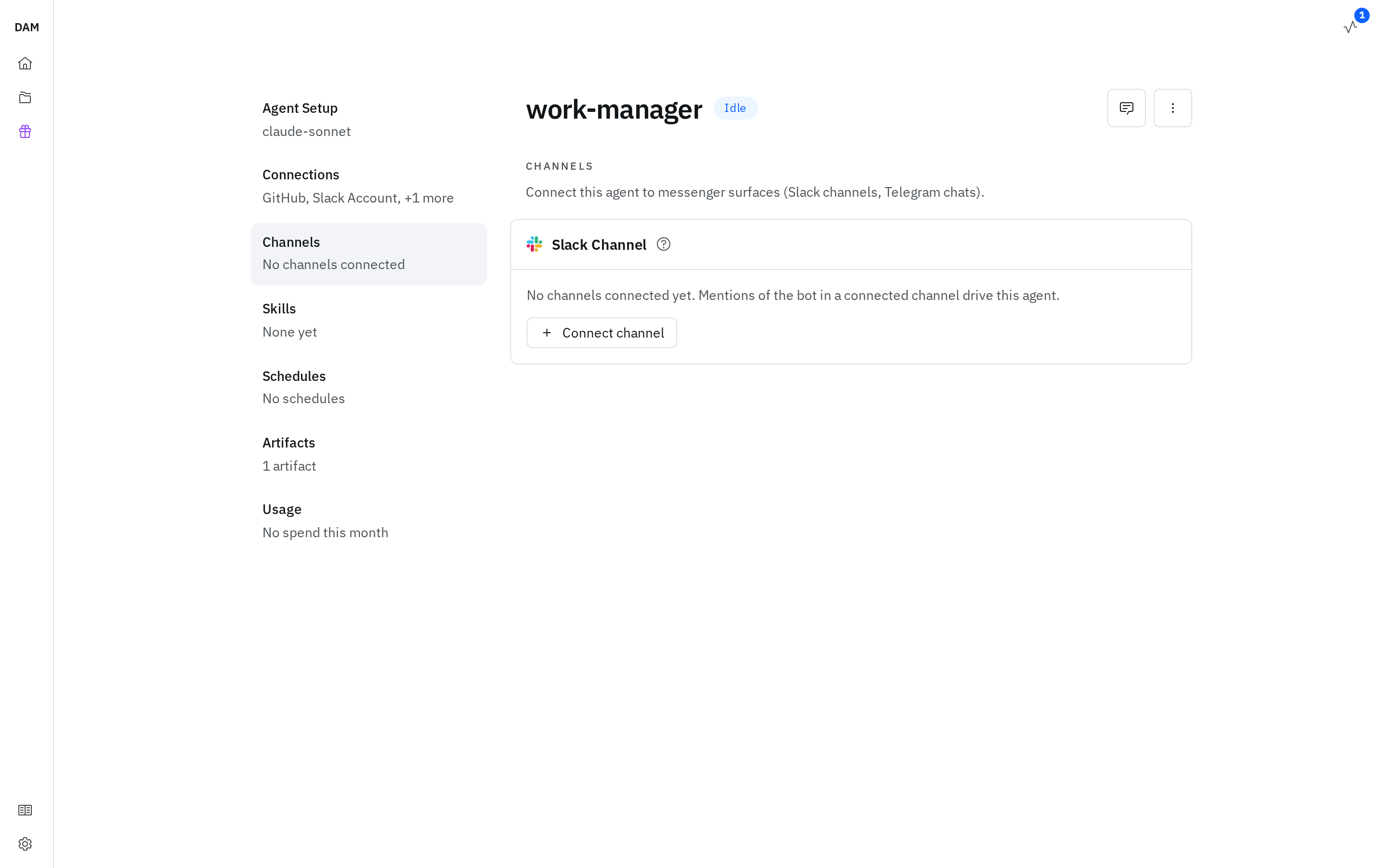
From the UI, open the agent and go to Channels. The Slack card lists the channels already connected — each with whether ambient is on, and a Default badge where this agent is the one unnamed mentions reach — and Connect channel adds another by its channel id. A connected channel's ⋯ menu offers Edit (to flip ambient) and Disconnect. The channel itself can't be swapped for a different one: connect the channel you want and disconnect this one.
If the section says no messenger is set up
Channels only lists what your operator has configured. Where no messenger is wired up, the section says so and points you at them rather than showing an empty list.
From the CLI:
dam channel slack connect <agent> --channel-id <C0…>              # mentions-only
dam channel slack connect <agent> --channel-id <C0…> --ambient    # ambient on from the start
Re-running connect for the same agent and channel updates that binding in place — which is how
you change ambient mode from the CLI, with no disconnect needed. Connecting a further channel to the
same agent adds a binding rather than replacing one, and so does connecting a different agent to a
channel that already has one — see
several agents in one conversation. There's no default
command in the CLI; that's set in-chat with /dam default.
Because an agent can hold several channels, disconnect needs to know which one to release:
dam channel slack disconnect <agent>                          # only when one channel is connected
dam channel slack disconnect <agent> --channel-id <C0…>       # required once there are several
See the CLI reference.
/dam bind from inside Slack does the same job, and is the quickest route for a channel you're
already in.
Troubleshooting
| Problem | Solution |
|---|---|
There's no DAM app to invite, or /dam isn't a command here |
The app isn't installed in this workspace — request it |
| Bot doesn't respond in a channel | Make sure you @mention it, and that the conversation is bound (/dam bind) |
| "This conversation isn't connected" / "No instance connected to this channel" | Run /dam bind to connect one of your agents |
| Binding refused as already connected | That same agent is already connected here — binding a different one is allowed and adds it |
| A mention with no name reached nobody | The conversation has no default agent — its owner can set one with /dam default <agent> |
| The wrong agent answered | Start the message with the agent's name; an unknown or ambiguous name falls back to the default |
"Link your account first" on unbind, ambient, default, whisper … on\|off, ignore, unignore, or delete |
Run /dam login once in the channel, then retry — expected if you bound from the CLI |
| Can't unbind | Only the person who bound the conversation, or the agent's owner, can release it |
| Agent replies to things nobody asked it | Ambient mode is on — /dam ambient off for mentions-only |
| An attached file was ignored | You'll have had a private note saying why — usually over a size cap, or a picture format the agent can't read |
| "they total … over the 30 MB of images" | 30 MB of images per message — send fewer or smaller |
| "the files on this message add up to more than …" | 20 MB of files per message — send them a few at a time |
| Slow first reply | It's likely waking from hibernation — up to a minute or two |
| It answered without the image | The agent's harness may not support images; you'll have had a private note |